# Body

## The `body` bone configuration

The `body` bone serves as the primary visible part of the model that corresponds to the **Hull** component. \
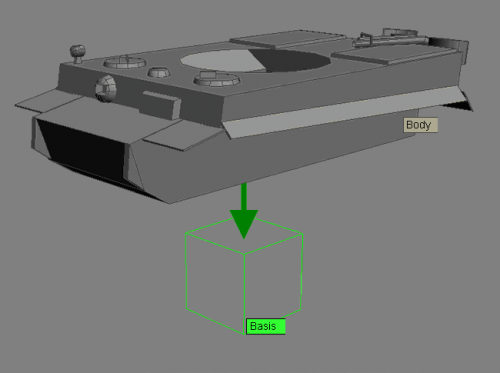
The `body` bone is linked to the `basis` bone.

<figure><img src="/files/jlYylMTz0yReAsH8ItRe" alt=""><figcaption><p>The <code>body</code> bone linked to the <code>basis</code> bone</p></figcaption></figure>

**Properties of the `body` bone:**

<table data-header-hidden><thead><tr><th width="211">Property</th><th>Description</th></tr></thead><tbody><tr><td><code>poly</code></td><td>Makes the hull of the vehicle visible.</td></tr><tr><td><code>ID=body</code></td><td>Unique identifier for the "Hull" component.</td></tr><tr><td><code>Animation</code></td><td><p>Specifies animation name and parameters, separated by commas:</p><ul><li><code>break</code>: hull destruction animation (if applicable)</li><li><code>repair</code>: hull repair animation for the X-model (if applicable).</li></ul></td></tr></tbody></table>

<figure><img src="/files/XFzMtkSrMkNEvmUvKZio" alt="Properties window of the body bone"><figcaption><p>Properties window of the <code>body</code> bone</p></figcaption></figure>

## Elements linked to the `body` bone

* **Primary component bones:**
  * `turret`;
  * `engine`;
  * `cabin`: vehicle cabin;
  * transmission elements.
* **Secondary bones:**
  * `detail`: additional visual elements of the hull;
  * `сover`;
  * `shield`: additional armor parts;
  * `enumerator`: vehicle identifier (if applicable).
* **Volumes:**
  * `body_vol`: volumes for armor and collision calculations;
  * `ram_vol`: volume for ramming calculations;
  * and other types of volumes in the presence of corresponding model components.
* **Helper bones:**
  * `visor2`: vision bone aligned with the movement vector;
  * `emit`: passenger and crew entry points into the vehicle;
  * `seat`: passenger seating points on the armor;
  * `mgun`: machine gun bones;
  * effectors for headlights and brake lights.


---

# Agent Instructions: Querying This Documentation

If you need additional information that is not directly available in this page, you can query the documentation dynamically by asking a question.

Perform an HTTP GET request on the current page URL with the `ask` query parameter:

```
GET https://docs.bestway.com.ua/modeling/vehicle-model-setup-pipeline/bone-hierarchy-in-vehicle-models/body.md?ask=<question>
```

The question should be specific, self-contained, and written in natural language.
The response will contain a direct answer to the question and relevant excerpts and sources from the documentation.

Use this mechanism when the answer is not explicitly present in the current page, you need clarification or additional context, or you want to retrieve related documentation sections.
